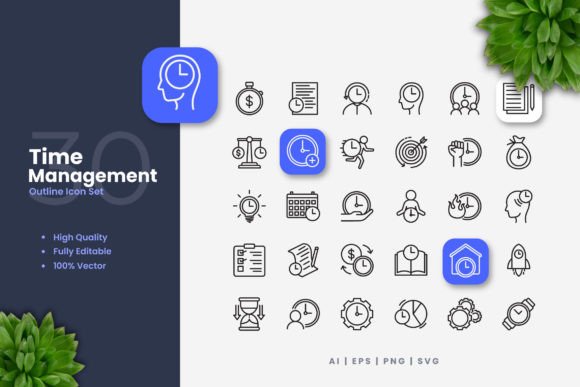
Time Management Icons: Visual Tools for Busy Modern Lives
You’ve likely seen them everywhere: a small calendar symbol in an app interface, a sleek clock icon on a project dashboard, or a minimalist stopwatch graphic on a workshop flyer. These are Time Management Icons, a curated collection of vector graphic symbols dedicated to representing concepts of time, schedules, deadlines, and productivity. But they are far more than just decorative pixels. They are a practical, universal visual language designed to communicate efficiency, planning, and progress across countless projects.
Imagine you’re launching a new productivity app. You need to instantly convey the function of a “set reminder” button without relying solely on text. A well-designed bell or alarm icon does that. Or perhaps you’re a freelance coach creating a client workbook. A clean, professional hourglass icon in the chapter on focus techniques adds visual clarity and reinforces your message. These icons serve as silent, efficient guides, directing attention and explaining functions faster than words often can.
Where These Icons Make a Practical Difference
The utility of Time Management Icons stretches across the digital and physical worlds, fitting seamlessly into the workflows of creators, educators, business owners, and anyone looking to organize information visually.
For Digital Creators and App Developers
When building a website, mobile app, or software interface, consistent iconography is crucial for user experience. Using a set of Time Management Icons ensures that every time-related feature—from a timeline view to a scheduling tool—is represented with a cohesive visual style. This creates a sense of reliability and professionalism. Because these icons are provided in vector formats like SVG and AI, you can scale them perfectly for high-resolution retina displays or shrink them for a mobile navigation bar without any loss in quality. Changing their color to match your brand’s palette in Adobe Illustrator is a matter of minutes, not a redesign project.
In Educational and Training Materials
Teachers, course creators, and corporate trainers often need to break down complex processes. A simple infographic showing a project timeline, using icons for “start date,” “milestone,” and “review,” makes the information more digestible. These icons can be dropped into PowerPoint presentations, e-learning modules, or printed handouts. The editable stroke weight means you can make the lines thicker for a bold poster or thinner for a subtle footnote in a textbook, maintaining clarity across different mediums.
For Marketing and Business Communication
A small business owner promoting a “limited time offer” on social media can use a striking clock icon to grab attention. A consultant designing a flyer for a time management workshop can incorporate icons of calendars and checklists to visually summarize the workshop’s benefits. The included PNG files with transparency make this drag-and-drop process effortless for use in online ads, email banners, or printed posters. The visual cue immediately signals the topic, helping potential clients understand the offer at a glance.
Personal and Freelancer Projects
Even for personal use, these icons hold value. A blogger writing about productivity might embed a simple “focus” icon to break up text and highlight a key tip. A hobbyist designing a personal planner or habit tracker printable can use the icons to label sections. The fact that the set is fully customizable means you aren’t locked into a pre-made style; you can adjust the icons to feel personal and unique, matching the tone of your blog, your brand, or even your mood board.
Considering the Right Set for Your Needs
Before downloading or purchasing any icon set, it’s wise to think about your actual workflow. The promise of “100 vector icons” is excellent, but the real question is: do the specific symbols cover the scenarios you’ll encounter? A good Time Management Icons set should include not just clocks and calendars, but also icons for deadlines, milestones, waiting, efficiency, alarms, and progress tracking. Review the typical symbols to ensure they align with your projects.
Another practical consideration is software compatibility. The mention of source files like AI (Adobe Illustrator) and EPS is vital for professionals who need deep editing control. If you primarily use simpler design tools, the SVG and ready-to-use PNG files might be your go-to formats. The “editable stroke” feature is particularly powerful for branding; it allows you to match the icon’s line thickness to your company’s existing design guidelines, creating a unified look across all your materials.
The “easy drag and drop” aspect speaks to speed. When you’re under a deadline to produce a flyer or update an app screen, you don’t want to spend hours tweaking graphics. Having pre-made, high-quality icons that you can quickly import and slightly adjust saves precious time, letting you focus on the content and message itself.
The Real Outcome: Clarity and Cohesion
The ultimate benefit of using a dedicated set like Time Management Icons isn’t just having pretty graphics. It’s about achieving visual consistency and communicative efficiency. When your audience sees the same style of time icon across your app, your marketing materials, and your internal documents, it builds a subconscious association with your brand or project. It reduces cognitive load for the user—they learn the visual language once and understand it everywhere.
For the entrepreneur, it means professional-looking materials without hiring a graphic designer for every small task. For the educator, it means creating more engaging learning aids. For the developer, it means a smoother, more intuitive user interface. The versatility across print (books, posters, flyers) and digital (websites, apps, social media) ensures that your visual strategy doesn’t fracture when you move from one medium to another.
In a world where everyone is managing busy schedules and information overload, these icons act as subtle anchors. They help you design systems that are not only functional but also clear and visually calm. Whether you’re illustrating the steps of a complex process or simply needing a symbol to denote “time saved,” having a reliable, customizable set of visual tools at your fingertips can be the small detail that makes your project stand out and function better.