The Cooking Icon Pack: An Evaluation for Designers and Developers
In digital design, visual communication is paramount. For projects related to food, culinary services, recipe platforms, or restaurant branding, having a cohesive set of graphical elements can significantly enhance user experience and aesthetic coherence. The Cooking Icon Pack, comprising 150 stylish icons that showcase popular services and ideas, presents itself as a potential solution. This article provides an objective evaluation of this asset, examining its features, potential applications, and considerations for potential users.
What is the Cooking Icon Pack?
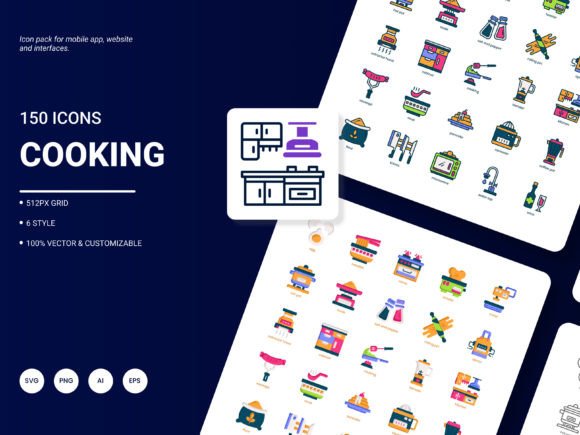
The Cooking Icon Pack is a curated collection of 150 icons centered around culinary themes. The icons are described as stylish and designed with a fresh, trendy aesthetic. They are intended for use across various digital mediums, including website design, mobile applications, presentations, analytical reports, infographics, and website templates. The set is offered in multiple file formats—AI, EPS, SVG, PNG, PDF, and JPG—and is advertised as easily editable and flexible for integration into projects.
Core Features and Specifications
The advertised features of the Cooking Icon Pack form the basis of its utility. A breakdown includes:
- Volume: 150 icons provide a broad range of culinary concepts.
- Format Flexibility: Availability in six formats (AI, EPS, SVG, PNG, PDF, JPG) caters to different software and use cases, from vector editing to static web use.
- Style Consistency: The pack reportedly includes six styles, offering some variation within the set.
- Customizability: The icons are described as editable, allowing for color, size, or detail adjustments.
- Content Relevance: The icons focus on popular culinary content, aiming for immediate recognizability.
Potential Reasons for Interest and Key Benefits
Designers, developers, or content creators might consider the Cooking Icon Pack for several practical reasons.
Time Efficiency: Assembling a coherent set of cooking-related icons individually can be time-consuming. A pre-made pack with consistent styling offers a significant shortcut in the design phase, accelerating project timelines.
Visual Consistency: Using icons from a single pack ensures a uniform line weight, color palette (if applied consistently), and stylistic approach across an entire project. This consistency is crucial for professional-looking websites, apps, or branded materials.
Format Versatility: The inclusion of vector formats (AI, EPS, SVG) is a notable benefit. Vector graphics are infinitely scalable without quality loss, making them ideal for applications that require icons at various resolutions, from mobile screens to print materials. The PNG and JPG formats cater to simpler, raster-based implementations.
Ease of Integration: The promise of easy editing and flexible integration suggests the icons are designed with common design software in mind, potentially reducing technical hurdles during implementation.
Tradeoffs, Considerations, and Practical Expectations
While the features are appealing, a balanced evaluation requires examining potential tradeoffs and setting realistic expectations.
Style Specificity: A "fresh and trendy" style is subjective. This specific aesthetic may not align with every project's brand identity. For instance, a classic fine-dining restaurant website might require more minimalist or elegant icons than a trendy one. Evaluating the actual icon samples is essential to determine style compatibility.
Scope of Content: "Popular services and ideas" covers common concepts, but niche culinary topics might be absent. If a project requires very specific icons (e.g., for a rare cooking technique or specialized equipment), the pack may need supplementation.
Editability Depth: "Editable" can range from simple color changes in a PNG to full node manipulation in an SVG. The true extent of customization depends on the provided vector file quality and structure. Users with advanced modification needs should verify the editability of the core vector files.
License Clarification: A critical consideration not listed in the core features is the license agreement. Users must understand the permissible uses—whether it's for personal, commercial, single-project, or multi-project applications—before integration.
Situations Where the Cooking Icon Pack is a Strong Fit
This icon set could be a particularly effective choice in certain scenarios.
- Fast-Paced Digital Projects: For startups, food bloggers, or agencies developing a culinary app or website under tight deadlines, the pack offers a ready-made visual library.
- Projects Requiring Multi-Format Use: If the same icon set needs to appear in a scalable app UI (using SVG), a printed menu PDF, and a social media graphic (using PNG), the format variety is highly practical.
- Designers Seeking a Trendy Baseline: For projects aiming for a contemporary, stylish look in the food space, the pack could serve as a perfect foundational asset that can be slightly tailored.
When Alternatives Might Be Worth Considering
Alternative approaches or assets may be more suitable depending on project constraints and goals.
- Extreme Brand Customization: If a project's brand identity is highly unique and demands completely bespoke iconography, commissioning custom icons or creating them from scratch might yield a better fit than modifying a pre-made set.
- Budget for Single-Icon Use: If a project only requires two or three specific cooking icons, purchasing a full 150-icon pack might be inefficient. Many stock asset sites offer individual icon purchases or smaller, more targeted sets.
- Open-Source or Free Resource Needs: For projects with minimal budget, exploring reputable open-source icon libraries might provide viable, though potentially less cohesive, alternatives.
- Requirement for a Specific, Niche Style: If the project demands a style not covered by "trendy" (e.g., hand-drawn, 3D, isometric), searching for a pack dedicated to that specific aesthetic is advisable.
Practical Decision-Making Insights
To determine if the Cooking Icon Pack aligns with your needs, undertake a structured evaluation.
First, audit your project's visual requirements. List the exact culinary icons you need and compare it to the pack's advertised scope. Assess the required formats and the level of customization you will perform.
Second, seek visual samples. Before any commitment, review actual icons from the Cooking Icon Pack. Critically assess their style, detail level, and recognizability against your project's mock-ups or style guides.
Third, investigate the license. Clarify the usage rights. Ensure it covers your project type, client count, and distribution method.
Finally, compare against alternatives. Based on your audit, briefly research other paid sets, individual icons, or free resources. The decision should balance cost, time savings, visual fit, and long-term usability of the assets.
The Cooking Icon Pack presents a compelling offer for many culinary-themed digital projects. Its main strengths lie in volume, format variety, and the promise of a consistent, editable trendy style. Its value is maximized when project requirements broadly match its content scope and aesthetic. For projects needing extreme specificity, bespoke branding, or only a handful of icons, alternative paths should be explored. By methodically matching the pack's features against your specific design goals and constraints, you can make an informed decision on whether this asset will effectively serve your project's needs.
Note that the provider invites suggestions for future updates, indicating a potential for the set to evolve based on user feedback. This responsiveness could be a positive factor for users invested in the long-term development of the asset.